Wayfinding system
Class Project
Problem
Problem
Problem
We were tasked with making a wayfinding system for the Fine Arts building at Binghamton University. The wayfinding system currently is pretty much nonexistent, and the building itself is also really confusing and hard to follow.
We were tasked with making a wayfinding system for the Fine Arts building at Binghamton University. The wayfinding system currently is pretty much nonexistent, and the building itself is also really confusing and hard to follow.
What we need
What we need
What we need
an identity with a custom logotype and consistent branding throughout. We need in-depth maps, with a custom icon system, a color coding system as well as updated signage and super graphics that reflect the system we are looking to create.
an identity with a custom logotype and consistent branding throughout. We need in-depth maps, with a custom icon system, a color coding system as well as updated signage and super graphics that reflect the system we are looking to create.
Our Solutions
Our Solutions
Our Solutions
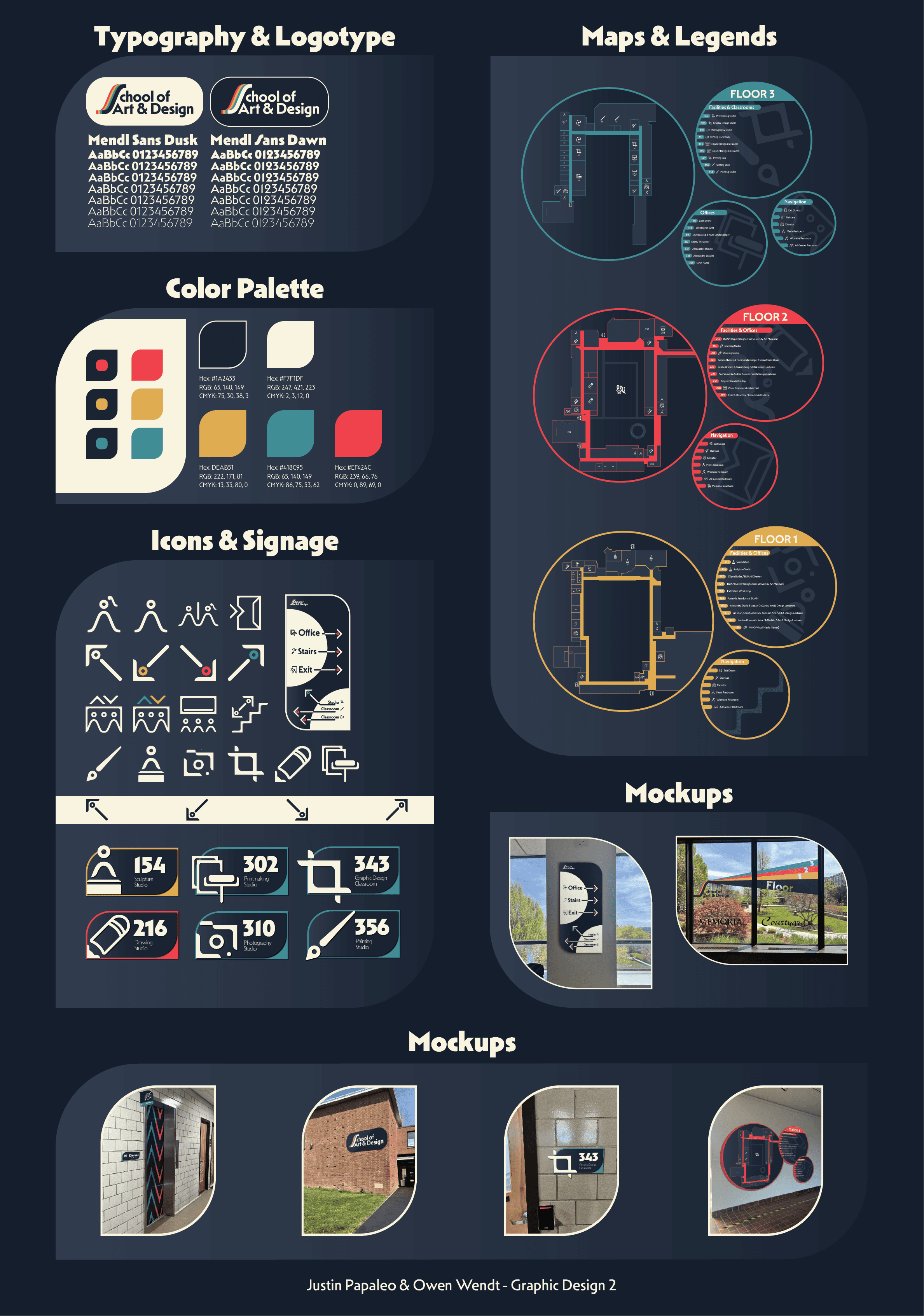
we created a logotype designed to reflect the values and ideas of Art and Design at Binghamton. The palette we chose is high contrast with accents of CMY inspired colors to bring out a feeling of creativity while also keeping it professional. The S is dynamic to show a sense of movement and evolution always present within the department. We took this palette and implemented it in the system in effective ways that help someone walking into the building to easily navigate. The first step in this process was making an icon system. We took a 20x20 grid and designed the icons around this system. We used proportionate stroke sizes to create a cohesive icon system that felt very original. We did this by using circles and using the S from the logotype as well as lines with one or two corners rounded. Next we had to make maps for the building, and we needed a way to differentiate floors. Our solution was to color code the floors with colors from our logotype. This helps the viewer navigate more efficiently, and gives each floor its own identity. We then put our Icons in the maps where they corresponded to and gave it that off-white color we used to contrast with the navy blue of the background. We also color coded the arrows on the icons to match which floors they were pointing to. We filled in the hallway paths, but kept the rest as an outline to give the viewer a better understanding of where they can and should walk. The last step in the process was to create signage and super graphics. We used the rest of the system as a guide to create these and used the icons in our classroom signs to connect it back to the maps. Then we create signage pointing to where certain areas would be using color coded arrows once again. Lastly we mocked up what a super graphic might look like explaining the color coding of the floors, and we also mocked up all of our signage as well. All of this together creates a cohesive system that anybody walking into the building can understand and navigate very easily.
we created a logotype designed to reflect the values and ideas of Art and Design at Binghamton. The palette we chose is high contrast with accents of CMY inspired colors to bring out a feeling of creativity while also keeping it professional. The S is dynamic to show a sense of movement and evolution always present within the department. We took this palette and implemented it in the system in effective ways that help someone walking into the building to easily navigate. The first step in this process was making an icon system. We took a 20x20 grid and designed the icons around this system. We used proportionate stroke sizes to create a cohesive icon system that felt very original. We did this by using circles and using the S from the logotype as well as lines with one or two corners rounded. Next we had to make maps for the building, and we needed a way to differentiate floors. Our solution was to color code the floors with colors from our logotype. This helps the viewer navigate more efficiently, and gives each floor its own identity. We then put our Icons in the maps where they corresponded to and gave it that off-white color we used to contrast with the navy blue of the background. We also color coded the arrows on the icons to match which floors they were pointing to. We filled in the hallway paths, but kept the rest as an outline to give the viewer a better understanding of where they can and should walk. The last step in the process was to create signage and super graphics. We used the rest of the system as a guide to create these and used the icons in our classroom signs to connect it back to the maps. Then we create signage pointing to where certain areas would be using color coded arrows once again. Lastly we mocked up what a super graphic might look like explaining the color coding of the floors, and we also mocked up all of our signage as well. All of this together creates a cohesive system that anybody walking into the building can understand and navigate very easily.
Logotype/Typography
Logotype/Typography
Logotype/Typography
The typeface we used was Mendl Sans, which comes in 2 forms; Mendl Sans Dusk and Mendl Sans Dawn. It also has weights ranging from hair to black, and offers a lot of versatility and creative freedom.
The typeface we used was Mendl Sans, which comes in 2 forms; Mendl Sans Dusk and Mendl Sans Dawn. It also has weights ranging from hair to black, and offers a lot of versatility and creative freedom.
Icon System & Signage
Icon System & Signage
Icon System & Signage
Our icon system revolves around using similar shapes to the letterforms of our typeface, Mendl Sans. Each icon falls into as system of a 20x20 square grid, and the strokes of each icon range from 0.5 to 2 boxes on the grid, depending on the size. Our signage utilizes these icons as well as our color palette to create a cohesive system. The navy blue and off white are the main contrasting colors, with subtle accents of the color that is coded to the floor the signage is on. The shapes of our signage also align with the letterforms, taking on forms with a mix of curved and sharp edges.
Our icon system revolves around using similar shapes to the letterforms of our typeface, Mendl Sans. Each icon falls into as system of a 20x20 square grid, and the strokes of each icon range from 0.5 to 2 boxes on the grid, depending on the size. Our signage utilizes these icons as well as our color palette to create a cohesive system. The navy blue and off white are the main contrasting colors, with subtle accents of the color that is coded to the floor the signage is on. The shapes of our signage also align with the letterforms, taking on forms with a mix of curved and sharp edges.
Maps
Maps
Maps
For our maps, we tried to take on a unique approach to our formatting. We used circular frames for the maps and had the legends for each map be a smaller circle branching off. These maps are our central focus for our system because it blends our initial principles into one large piece.
For our maps, we tried to take on a unique approach to our formatting. We used circular frames for the maps and had the legends for each map be a smaller circle branching off. These maps are our central focus for our system because it blends our initial principles into one large piece.